

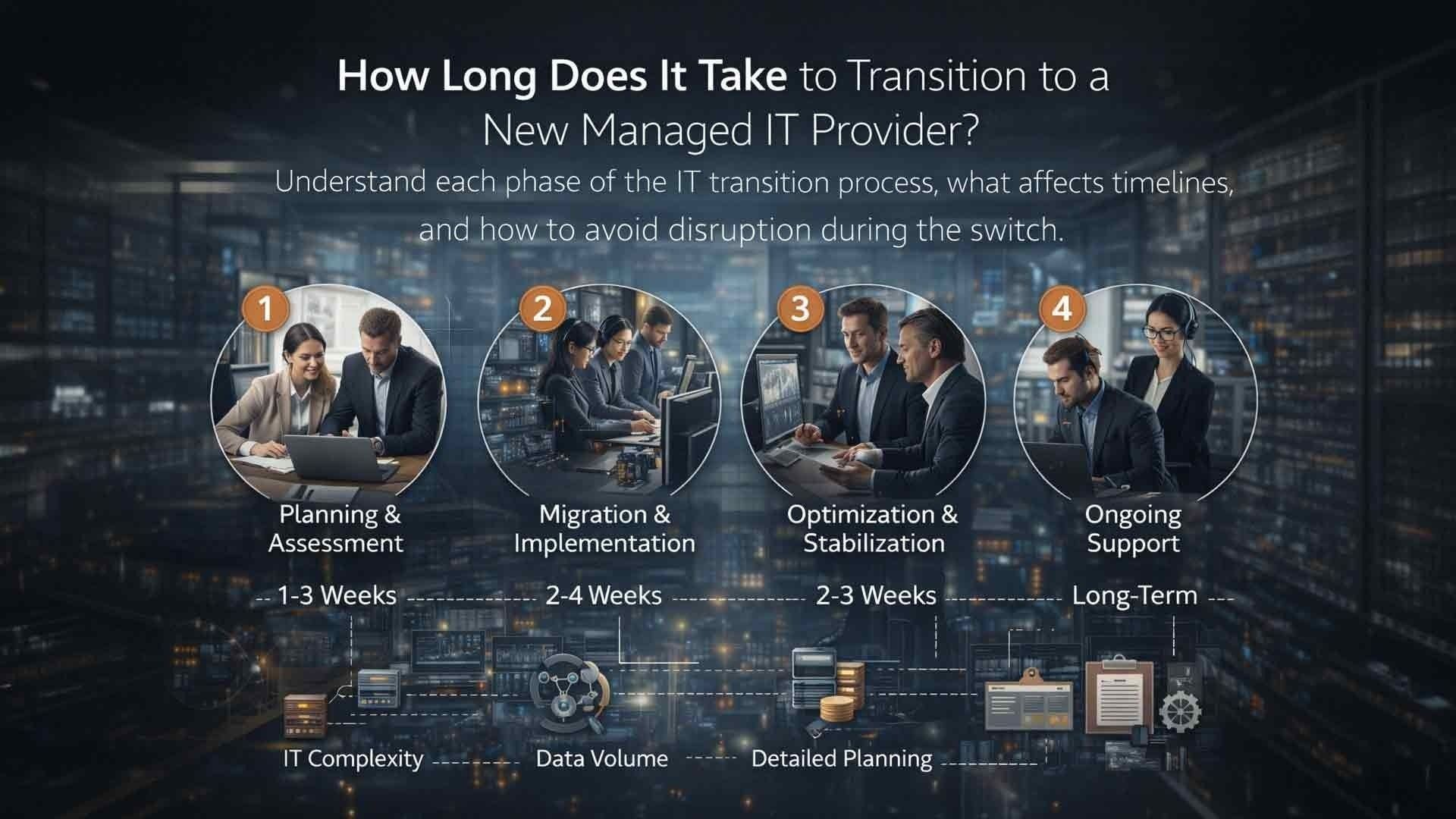
For many businesses, changing IT providers feels like defusing a bomb. Everything is technically working—even if support is slow, communication is frustrating, or your current provider has stopped feeling like a partner. The fear is real: downtime, lost data, confused employees, and nobody owning the mess if something breaks mid-transition.
Here's the truth: a poorly managed IT transition does create disruption. But a well-managed one feels controlled, quiet, and predictable. Most businesses that hesitate to switch aren't really afraid of the transition itself—they're afraid of doing it wrong.
This article walks you through exactly what happens during a managed IT provider transition, how long each phase actually takes, and what you should watch for to make sure yours goes smoothly.
The Short Answer: How Long Does an IT Transition Take?
Most transitions to a new managed IT provider take 30 to 90 days from initial kickoff to full steady-state management. Some simpler environments move faster. More complex organizations—those with multiple locations, hybrid cloud infrastructure, or strict compliance requirements—can take longer.
The timeline depends on several factors:
- Size of your organization — headcount, number of endpoints, locations
- Complexity of your IT environment — cloud vs. on-premise, custom applications, integrations
- Documentation quality from your current provider — good docs speed everything up
- Security and compliance requirements — regulated industries like healthcare and finance add steps
- Number of remote users and branch offices
- Cooperation level of the outgoing provider
Speed matters, but it's not the only thing that matters. Control and clarity at every step matter more. A rushed transition that skips the security baseline phase is far more dangerous than one that takes an extra two weeks to do it right.
What "Transition" Actually Means in Managed IT
Before walking through the phases, let's clear up a common misconception. Transitioning to a new managed IT provider does not mean ripping out your systems and starting over. In the vast majority of cases, your existing infrastructure stays in place.
What changes is who manages it, who monitors it, and who answers when something breaks.
A managed IT transition involves:
- Gaining full visibility into your current environment
- Establishing monitoring, alerting, and security coverage
- Documenting systems, processes, and configurations
- Taking over day-to-day support responsibility
- Aligning your IT roadmap with your actual business priorities
Good providers focus on stability first, optimization second. They're not going to walk in on day one and start recommending a full hardware refresh. They're going to make sure nothing falls through the cracks while they learn your environment.
Phase 1: Pre-Transition Planning and Discovery
Typical Timeline: 1–2 Weeks
The transition starts before any technical changes occur. This is the planning phase, and it's easily the most important one for preventing surprises later.
During this stage, your new provider gathers information including:
- Network diagrams and architecture documentation
- Server and workstation inventories
- User lists and access permissions
- Backup and disaster recovery configurations
- Security tool and policy documentation
- Vendor contracts and software license details
If your current provider has kept clean documentation, this phase moves quickly. If documentation is sparse or disorganized—which is more common than you'd think—discovery takes longer, and your new provider will need to run their own audit tools to fill the gaps.

What you should do during this phase: Be as available and transparent as possible. Share what you have. The more your new provider understands upfront, the fewer surprises arise in weeks two through six.
Phase 2: Access and Knowledge Transfer
Typical Timeline: 1–2 Weeks
Once planning is complete, your new provider secures the administrative access they need to operate within your environment. This phase includes:
- Obtaining administrative credentials for key systems
- Verifying that access is complete and functional
- Reviewing existing configurations for anomalies or risks
- Identifying any immediate security concerns that need same-day attention
In ideal situations, the outgoing provider cooperates fully and hands over access cleanly. In more difficult transitions—especially if the relationship with your current provider ended on poor terms—access delays can extend this phase.
A professional managed IT provider plans for both scenarios. They'll have processes for gaining access through alternate means if a departing provider is uncooperative. If you're considering a switch, it's worth knowing your administrative credentials and where they're stored *before* you give notice to your current vendor.
Phase 3: Security Baseline and Monitoring Setup
Typical Timeline: 2–4 Weeks
This phase is the backbone of a safe transition. Before making any major changes to your environment, your new provider focuses on getting full visibility and reducing risk.
This typically includes:
- Deploying remote monitoring and management (RMM) tools
- Establishing alerting thresholds and escalation paths
- Reviewing patch levels across endpoints and servers
- Verifying that backups are running and restorable
- Assessing your overall cybersecurity posture
Why does this matter so much in 2026? Cyberthreats have continued to grow in sophistication. Ransomware attacks on SMBs remain one of the most common and costly IT incidents businesses face. The window between a provider transition—when monitoring coverage may be inconsistent—is exactly when attackers look for gaps.
A new provider that skips or rushes this phase is cutting a corner that could cost you everything. Insist on a documented security baseline before moving forward.
Many businesses notice a significant improvement in response time and visibility during this phase alone, even before optimization work begins.
Phase 4: Support Transition and Ticket Handling
Typical Timeline: 1–2 Weeks
Once monitoring and access are established, your new provider begins handling day-to-day end-user support. This is when your employees first interact with the change.
During this phase, employees are informed of:
- How to submit support requests (phone, email, portal)
- Who their primary contact is
- What response time expectations look like
- How urgent vs. non-urgent issues are prioritized
This phase often overlaps with the security setup phase. When done correctly, the support transition is quiet from the employee's perspective. The biggest changes they notice are usually faster response times and clearer communication—because those are often the reasons the business switched providers in the first place.
Pro tip: Have your new provider send a simple, plain-language communication to your staff explaining the change and how to get help. It reduces confusion and prevents shadow IT workarounds when people don't know who to call.
Phase 5: Documentation and Stabilization
Typical Timeline: 2–4 Weeks
As the new provider works inside your environment, they continue refining documentation and closing gaps discovered during earlier phases. This includes:
- Updating and completing system documentation
- Validating backup and disaster recovery procedures with test restores
- Standardizing configurations across devices and users
- Identifying legacy systems, outdated software, or aging hardware
- Establishing a baseline IT asset inventory
This phase is less visible than earlier ones, but it's critically important for long-term stability. The documentation produced here becomes the foundation for every support ticket, security audit, and IT planning conversation going forward.
Phase 6: Strategic Alignment and Roadmapping
Typical Timeline: Begins at Week 6–8, Ongoing
Once your environment is stable and well-documented, the relationship shifts from reactive to proactive. This is where a great managed IT provider separates itself from an average one.
Strategic alignment includes:
- A formal IT roadmap based on your business goals
- Budget planning for hardware refresh cycles and software renewals
- Security posture improvements and compliance planning
- Technology recommendations tied to business growth
Deloitte's research on next-generation managed services reinforces this shift well. According to their analysis, modernizing IT is no longer just about updating technology—it's about transforming IT from a business service provider into a business value driver. The best managed IT partners operate with that mindset from day one.
If your current provider has never once mentioned your technology roadmap or asked about your three-year business goals, that's a signal the relationship has stalled.
What Happens If the Outgoing Provider Won't Cooperate?
It happens. Providers who lose a client sometimes drag their feet on access transfers, withhold documentation, or respond slowly to handoff requests. It's frustrating, but it's manageable.
Here's what a competent new provider will do:
- Use discovery tools to audit your environment independently
- Work directly with vendors (Microsoft, your ISP, software vendors) to transfer ownership of accounts
- Identify all admin credentials that can be reset without the outgoing provider's involvement
- Escalate clearly if cooperation isn't forthcoming
The best protection against this scenario is to retain ownership of your own accounts and credentials from the start of any vendor relationship. You should always have direct access to your Microsoft 365 tenant, your domain registrar, your firewall, and your backup platform—regardless of who manages them.
How to Know Your Transition Is Going Well
Here are the signs a transition is on track:
- You have a documented transition plan with milestones and owners
- Response times meet or beat what was promised in your SLA
- Your staff knows who to call and how to reach them
- Backups have been tested and verified, not just confirmed as running
- You've received an initial security or network assessment
- A named account manager is in regular contact with you
If you're two months in and none of these things have happened, the transition may not be going as well as you think.
Frequently Asked Questions: Switching Managed IT Providers
1. Will my business experience downtime during the transition?
Not if it's managed correctly. A well-run transition is designed around continuity. The goal is to transfer management responsibility without disrupting operations. Most businesses experience zero unplanned downtime during a properly phased transition.
2. Do I need to notify my current provider before the transition begins?
Yes, and timing matters. Check your contract for notice requirements—typically 30 to 90 days. Give notice after you've selected your new provider and have a transition plan in place, not before. This minimizes the window where your outgoing provider knows you're leaving but you haven't yet started the new relationship.
3. What if my current provider holds my data or account access?
Your data belongs to you. A reputable provider will not withhold access, though some less professional ones have tried. Your new managed IT provider should help you identify all accounts and credentials that need to be transferred and assist with recovery where access has been restricted.
4. How much does a managed IT transition cost?
Transition costs vary. Many managed IT providers—including AIS—include onboarding and transition support as part of the service agreement rather than charging a separate fee. Ask about this upfront when evaluating providers. A provider that charges a large, separate onboarding fee should be able to clearly explain what that covers.

5. Can we switch providers without telling our employees until it's done?
Technically yes, but it's not recommended. Employees who are surprised by IT changes tend to resist them. A simple, advance communication explaining what's changing—and, more importantly, how they get help—goes a long way toward a smooth day-one experience.
6. What's the biggest risk during an IT provider transition?
The biggest risk is a gap in monitoring or security coverage between when the old provider disengages and the new one is fully active. A professional transition plan overlaps coverage so there's never a window where systems are unmonitored. Always confirm this is addressed explicitly in your transition plan.
7. How do I evaluate whether a managed IT provider is good at transitions specifically?
Ask them directly. Request a documented onboarding and transition process. Ask for client references who have gone through a transition with them—not just happy long-term clients. Ask what happens if the outgoing provider doesn't cooperate. Their answers will tell you a lot about how prepared they are.
The Bottom Line
Switching managed IT providers is one of those decisions that feels riskier than it actually is when it's done by people who do it regularly. A 30-to-90-day timeline, broken into clear phases with documented milestones, is more than enough time to transfer responsibility cleanly—without downtime, confusion, or data risk.
The real risk isn't the transition. The real risk is staying with a provider that has stopped serving your business well, just because the switch feels complicated.
AIS has guided businesses across Las Vegas, Southern California, and surrounding regions through managed IT transitions for years. We hold a 96% Net Promoter Score and maintain an average client relationship of over seven years—because we build the kind of partnership that makes businesses want to stay, not switch again.
If you're wondering whether it's time to make a change, let's talk through it honestly.
Schedule a Free Consultation — no pressure, no sales pitch. Just a real conversation about where you are and what better IT support could look like for your business.
Or, if you're ready to connect right now: Contact AIS Today
Topics:
