

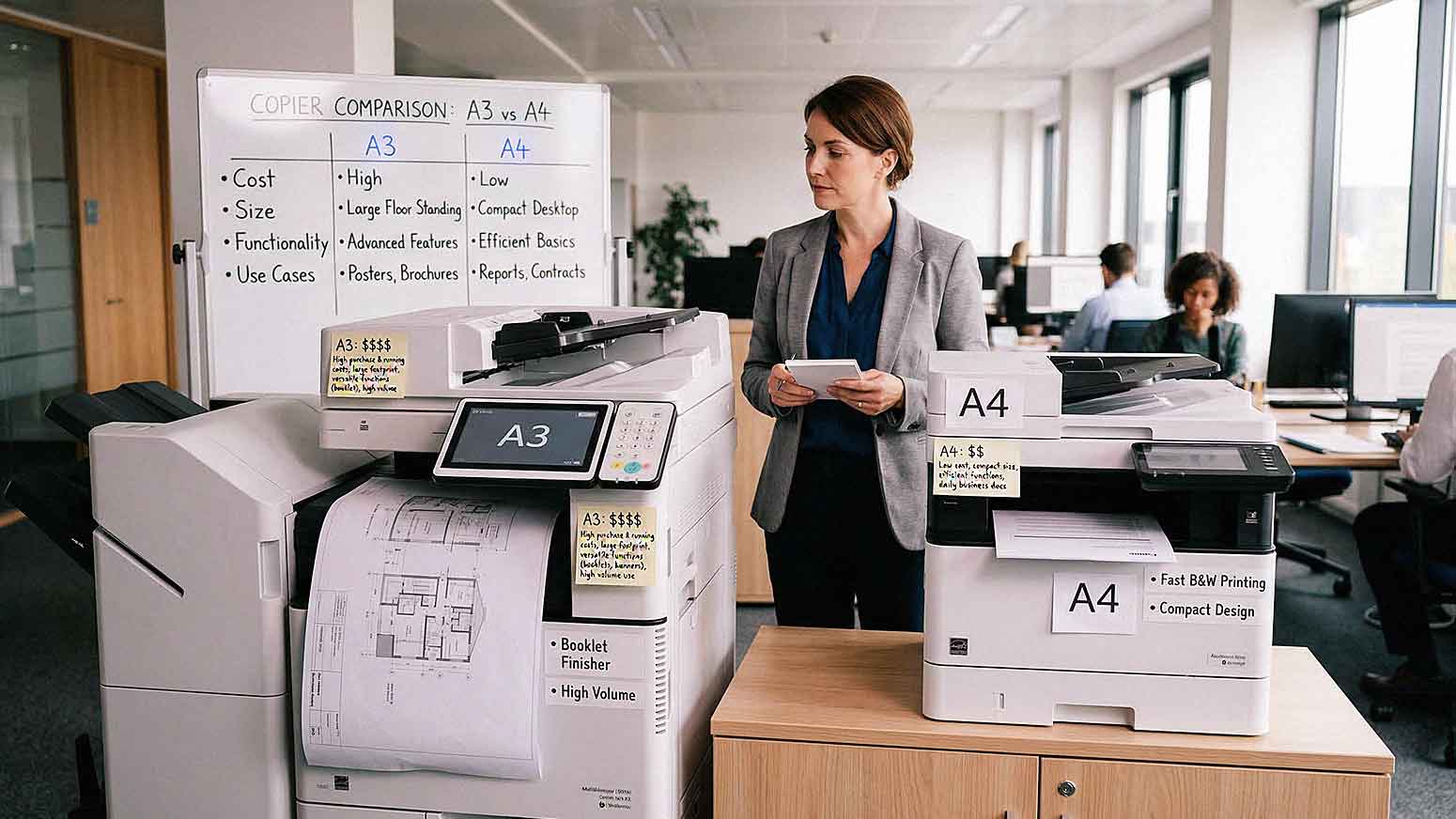
Not all office copiers are built the same — and that gap becomes painfully clear the moment you try to print an 11x17 spreadsheet on a device that only handles standard letter paper.
Choosing between an A3 and A4 copier is one of the most common questions businesses ask when setting up or upgrading their print environment. At first glance, it might seem like a simple size distinction. In reality, this decision touches nearly every part of your daily workflow: your budget, your physical office space, your print volume, and your long-term ability to scale without hitting equipment limits.
Pick the wrong device and you're either overpaying for capacity you'll never use, or you're constantly working around the limitations of a machine that can't keep up with your actual needs.
This article walks you through the real differences between A3 and A4 copiers, the scenarios where each one makes sense, what to expect on cost, and the questions you should be asking before you sign a lease or make a purchase.
What Is an A3 Copier?
An A3 copier is a multifunction device capable of printing, copying, scanning, and sometimes faxing on paper sizes up to A3 — which measures 297mm x 420mm, or approximately 11 x 17 inches (per Gartner's technical definition of ISO paper sizes).
In practical terms, A3 devices also handle all smaller paper sizes, including:
- Standard letter (8.5 x 11 inches)
- Legal (8.5 x 14 inches)
- Tabloid/ledger (11 x 17 inches)
A3 copiers are built for volume and versatility. They tend to be physically larger, feature richer finishing options, and carry higher monthly duty cycles. If your office regularly produces polished, high-volume, or large-format documents, an A3 device is typically engineered for that load.
What Is an A4 Copier?
An A4 copier handles standard document sizes. In the U.S. market, A4 aligns closely with 8.5 x 11 inch letter-size paper — the format used for the vast majority of everyday business documents.
A4 devices are designed with a specific profile in mind:
- Compact footprint — easier to place in smaller offices, shared workspaces, or satellite locations
- Lower print volumes — built for moderate monthly output, not sustained high-volume runs
- Straightforward functionality — print, copy, scan, and basic finishing without the heavier feature set of A3 machines
For businesses whose printing needs are largely standard documents — invoices, correspondence, internal reports — an A4 device can be exactly the right tool for the job.

Key Differences Between A3 and A4 Copiers
Here's a side-by-side breakdown of where these two device categories actually differ:
| Feature | A3 Copier | A4 Copier |
|---|---|---|
| Maximum paper size | 11 x 17 in (tabloid) | 8.5 x 11 in (letter) |
| Physical size | Larger, floor-standing or heavy desk unit | Compact, desk-friendly |
| Monthly duty cycle | High (typically 50,000–150,000+ pages) | Moderate (typically 5,000–30,000 pages) |
| Finishing options | Stapling, hole punch, booklet, folding | Basic or limited |
| Cost (lease/purchase) | Higher upfront and monthly | Lower upfront and monthly |
| Cost per page | Often lower at scale | Can be higher per page at high volume |
| Ideal environment | Corporate offices, print-heavy departments | Small offices, remote/satellite locations |
The most important thing to notice in that table: A3 copiers often deliver a lower cost per page at scale. That means a business printing high volumes might actually spend *more* in the long run by choosing a cheaper A4 device that isn't built for that workload.
When an A3 Copier Makes Sense for Your Business
You Regularly Print Larger Format Documents
This is the clearest signal. If your team routinely produces any of the following, an A4 device simply cannot do the job without outsourcing or reformatting:
- Marketing materials (brochures, posters, event flyers)
- Architectural or engineering drawings
- Financial spreadsheets that span multiple columns
- Training manuals with side-by-side layouts
- Legal documents in tabloid format
Trying to cram large-format content onto letter-size paper creates readability problems, quality issues, and productivity waste. An A3 copier eliminates that friction entirely.
Your Print Volume Is High
A3 copiers are engineered for sustained, high-volume output. If your office runs thousands of pages per week — or you manage a print-heavy department like HR, legal, or marketing — a device built for that duty cycle will outlast and outperform a lower-capacity machine.
High-volume environments where A3 devices consistently make sense include:
- Corporate offices managing large document workflows
- Schools and universities printing course materials and administrative documents
- Healthcare facilities handling patient records and regulatory paperwork
- Law firms producing case documents and filings
You Need Advanced Finishing Features
If your business produces documents that need to look polished and professional, A3 devices offer finishing capabilities that A4 machines typically don't:
- Stapling
- Hole punching
- Booklet creation
- Multi-sheet folding
These features save significant manual labor over time. If your team is regularly hand-stapling 50-page reports or assembling booklets by hand, the time savings from a proper finishing unit add up quickly.
When an A4 Copier Makes Sense for Your Business
You Run a Small or Mid-Sized Office with Standard Printing Needs
For businesses where the daily print mix is letters, invoices, proposals, and internal documents — all in letter size — an A4 copier handles everything you need. It also fits better in tighter spaces: small offices, shared suites, or home offices supporting a hybrid workforce.
Common A4-friendly environments:
- Small professional offices (accounting firms, insurance agencies, real estate offices)
- Remote workspaces and home offices
- Satellite or branch locations with limited print volume
- Retail environments printing receipts, schedules, or basic reports
Your Monthly Print Volume Is Moderate
If your business prints a few hundred to a few thousand pages per month, you don't need the capacity headroom — or the cost — of a high-volume A3 machine. An A4 device sized appropriately for your actual volume will perform reliably without unnecessary overhead.
Pushing a small team to share a large A3 machine just to "grow into it" often means paying lease costs for capacity that never gets touched.
Budget Is a Primary Constraint
A4 copiers generally carry:
- Lower monthly lease payments
- Lower upfront purchase cost
- Lower maintenance and service expenses
- Lower energy consumption
For cost-sensitive businesses — startups, nonprofits, small professional service firms — those savings are real and meaningful. Just make sure the device you choose can actually handle your workload. Underpowered equipment that breaks down regularly or runs out of capacity will cost you more through repairs, downtime, and lost productivity than you ever saved on the lease.
Cost Comparison: A3 vs A4 Copiers in 2026
Pricing varies significantly by brand, configuration, and whether you're leasing or purchasing. Here's a general framework for 2026:
A4 Copiers
- Entry-level purchase price: $300–$1,500
- Mid-range business models: $1,500–$4,000
- Monthly lease (typical SMB): $30–$100/month
- Cost per page (black & white): $0.01–$0.03
A3 Copiers
- Mid-range models: $4,000–$10,000+
- High-volume/enterprise configurations: $10,000–$25,000+
- Monthly lease (typical SMB): $100–$400+/month
- Cost per page (black & white): $0.005–$0.015 at volume
The A3 cost-per-page advantage becomes significant at higher volumes. A business printing 10,000 pages per month at $0.015 per page saves $1,500/month compared to printing at $0.03 per page on an undersized A4 device — even before factoring in service calls from overworking the machine.
What About Multifunction Devices?
Most modern business copiers — both A3 and A4 — are multifunction printers (MFPs) that combine printing, scanning, copying, and sometimes faxing in one device. That matters because a standalone printer that can't scan means you're either adding a separate scanner or sending people to a different machine for different tasks.
When you're comparing A3 and A4 options, make sure you're comparing equivalent MFP configurations — not an A3 MFP against a basic A4 printer. The full feature set matters for an accurate cost-per-capability comparison.
AIS works with leading MFP brands — including Xerox, Kyocera, and HP — across both A3 and A4 configurations. That means when we make a recommendation, we're matching the right brand and model to your specific workflow, volume, and budget — not steering you toward whatever's easiest to sell.
How to Actually Decide: Questions to Ask Before You Choose
Before you finalize any copier decision, work through these questions honestly:
1. What is your average monthly print volume? Get the number from your current device's usage logs or estimate conservatively. Match the device's duty cycle to that number with room to grow.
2. What paper sizes do you actually print? If you've never printed anything larger than letter size, A3 capacity is cost you're not using. If you print tabloid regularly — even occasionally — A3 protects you from workarounds.
3. What finishing do you need? Stapling and hole punching in-house versus outsourcing those tasks has a real time and cost impact over 12–36 months.
4. How much physical space do you have? A3 floor-standing units need room. If your office is tight, a compact A4 device may be the only practical option regardless of features.
5. What's your total cost of ownership over the lease term? Don't compare just the monthly payment. Factor in cost per page, expected service costs, and the cost of *not* having the capacity you need.
FAQ: A3 vs A4 Copiers
What does A3 and A4 actually mean?
A3 and A4 refer to ISO paper size standards. A4 (210mm x 297mm, roughly 8.5 x 11 inches) is the standard document size used in most offices. A3 (297mm x 420mm, roughly 11 x 17 inches) is twice the area of A4 and is used for larger-format documents. An A3 copier can handle both sizes; an A4 copier cannot print A3.
Is an A3 copier always more expensive than an A4?
Generally, yes — both in purchase/lease price and in operating costs. However, A3 devices often have a lower cost per page at high volumes, so total cost of ownership depends heavily on your print volume. For high-volume users, an A3 device can actually be the more economical choice over time.
Can an A3 copier replace an A4 copier entirely?
Yes. A3 copiers handle all standard paper sizes, including letter and legal. If your budget and space allow for an A3 device, you don't need a separate A4 machine — the A3 will handle everything an A4 does, plus more.
What brands offer strong A3 and A4 options for SMBs?
In 2026, Xerox, Kyocera, and HP all offer reliable SMB-focused options in both A3 and A4 configurations. The right brand often comes down to your service relationship, specific feature requirements, and how the device integrates with your existing technology environment.

Should a small business lease or buy a copier?
For most SMBs, leasing makes more sense — it keeps monthly costs predictable, includes service and maintenance in many agreements, and allows you to upgrade as your needs change. Buying outright makes more sense if you have low volume needs, a longer replacement cycle, and the capital to spend without impacting cash flow.
How do I know if I'm printing at a high enough volume to justify an A3 copier?
A general guideline: if you're regularly printing more than 5,000–8,000 pages per month, the cost-per-page economics of an A3 device typically start to tip in its favor. If you're printing tabloid-size documents even occasionally, A3 is worth it regardless of volume.
Can AIS help me figure out which copier is right for my business?
Absolutely. AIS serves businesses across Las Vegas, Southern California, and surrounding regions. Our team will look at your actual print volume, document types, budget, and workspace before making any recommendation. We don't sell you more machine than you need — or less. Schedule a free consultation here.
The Bottom Line
There's no universal answer to the A3 vs A4 question — and that's exactly the point. The right device depends on your volume, your document types, your physical space, and your budget. Choosing based on price alone — or defaulting to a larger machine because it seems more capable — both lead to the same outcome: money wasted on a device that doesn't fit your actual workflow.
If you're printing standard documents at moderate volume in a compact space, an A4 MFP delivers everything you need without unnecessary cost. If you're producing large-format materials, running high volumes, or need professional finishing in-house, an A3 device pays for itself through efficiency and output quality.
The smartest move is to get an honest assessment of your current and projected needs before you commit to any equipment.
Ready to find the right fit for your office? The team at AIS will walk you through your options with no pressure and no guesswork.
Topics:
